
Intro #
Some days ago I saw this post on Reddit: LibreELEC and Kodi running on the SpacemiT K1. LibreELEC on RISC-V! I have a Milk-V Jupiter K1, so I had to try it.
It did not work out of the box on my Jupiter. The build failed in some places, the kernel hung in the HDMI audio driver and Kodi was falling back to software rendering. With some fixes it worked: Kodi with GPU acceleration, HDMI audio, 4K video and updates. I sent the fixes back as a pull request, and it was merged.
Then I thought: if this can run on a Jupiter K1, it can also run on a StarFive VisionFive 2 (Lite). They have almost the same GPU (Imagination PowerVR), and StarFive has a vendor kernel with a hardware video decoder.
So… can it? Yes!
What works #
I tested it on my VisionFive 2 v1.3B and my VisionFive 2 Lite (8 GB).
- Boots straight into Kodi, from SD card and (on the Lite) from NVMe
- GPU acceleration: OpenGL ES 3.2 on the
PowerVR B-Series BXE-4-32(closed Imagination driver + StarFive Mesa) - Hardware video decoding with the Wave511: H.264, HEVC and HEVC 10-bit, full 1080p movies in real time
- Play, pause, seek forward and back, stop, next movie
- VP8, VP9 and AV1 in software (AV1 1080p is too heavy for the CPU, ±7-8 fps)
- HDMI audio
- Ethernet, and WiFi and Bluetooth on the Lite (I paired a Bluetooth keyboard)
- Updates with a
.tarin/storage/.update
The same image works on both boards, with the StarFive U-Boot that is already in the SPI flash, or with the mainline U-Boot (2026.10) that is in the image.
Setup #
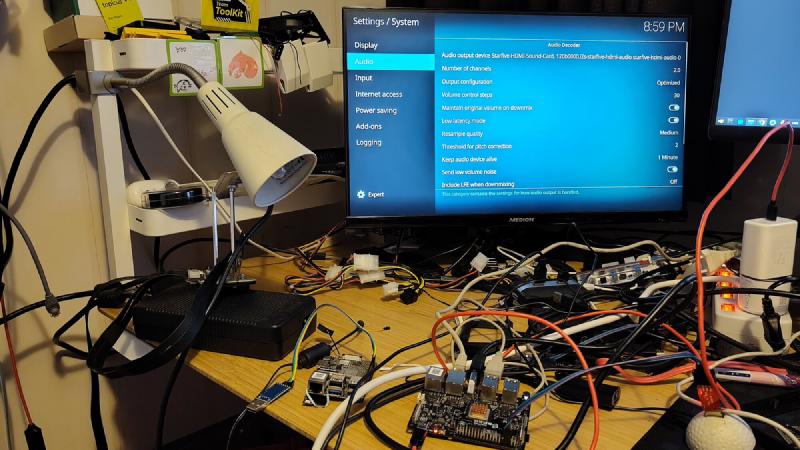
Same setup as with my Jupiter: Claude did the work, I watched (and some TV).
- A smart-plug with Home Assistant, so Claude can power the board on and off
- A USB to serial adapter, so Claude can stop U-Boot and get a root shell
- An HDMI capture card, to see what is on the screen
- Kodi can be controlled over JSON-RPC, so Claude wrote a small script to play, pause, seek and stop movies, and to check that the time keeps running
And me, for the stuff Claude can’t do: look at the screen, switch the boards, create / switch the SD card, plug in cables and flip the boot switches.
The fun parts #
The Lite has no SD card boot mode #
The VisionFive 2 has DIP switches to select the boot mode, the Lite has only a Boot key: SPI flash or UART. So the Lite always starts the U-Boot in the SPI flash. The StarFive U-Boot only looks at partition 3 of the SD card, and only booted with 4 GB of my 8 GB.
Now the image has a small partition 3 with a boot script for the StarFive U-Boot. It picks the right device tree, and now the Lite has 8 GB. With the mainline U-Boot it just boots with extlinux. The image also has the mainline U-Boot with a script to write it to the SPI flash by hand (it is never done automatically).
Booting from NVMe on the Lite needed a U-Boot patch too: the M.2 slot was not powered.
Seeking #
After a seek the video froze, and Kodi hung when you pressed stop. Claude found three things: FFmpeg asked for too few buffers (the Wave511 needs 18 before it starts decoding), the driver ignored a “start decoding again” command, and a fix from the mainline kernel was missing. Now seeking works.
Stripes on my monitor #
I saw thin stripes on my monitor, even in the Kodi menu. The capture card showed a clean picture… A loose HDMI cable. Not the board.
Random resets #
This was the big one. My VisionFive 2 rebooted by itself during playback, sometimes after 15 minutes, sometimes after 35 minutes.
First Claude found a real bug: the StarFive device tree has CPU speeds for two chips (1.5 GHz and 1.25 GHz), and the StarFive U-Boot removes the wrong set. The mainline U-Boot does not, so the CPU switched between both sets. That is fixed now (and the Lite no longer runs at 1.5 GHz). But the resets were still there!
Then we let the kernel print everything on the serial console and played movies for hours. Reset again, and not one message from the kernel. Nothing. So the board was reset from the outside…
Another power supply. 96 minutes of movies (H.264, HEVC and 10-bit), no reset. It was my power supply!
Download and flash #
Don’t want to build it yourself? There is a (test) release with an image you can flash right away: LibreELEC 13.0-devel for StarFive VisionFive 2 / 2 Lite.
Download the .img.gz and write it to a microSD card (or NVMe drive). Check the device name first (with lsblk), on my machine it was /dev/sda!
zcat LibreELEC-JH7110.riscv64-13.0-devel-20261118202807-b2c649c-visionfive2.img.gz | sudo dd of=/dev/sda bs=4M conv=fsync status=progressPut the card in the board and power it on. It works with the U-Boot that is already in the SPI flash. On a VisionFive 2 you can also set the DIP switches to SD card boot mode.
Pull request #
All the technical stuff (the commits, the boot layout, what is tested and what not) is in the pull request to LibreELEC: StarFive JH7110 (VisionFive 2 / VisionFive 2 Lite): add project.
If you want to build it yourself, get the branch feature/starfive-visionfive-2:
git clone --branch feature/starfive-visionfive-2 https://github.com/Opvolger/LibreELEC.tv.git
cd LibreELEC.tv
Option 1: on your own machine #
PROJECT=StarFive DEVICE=JH7110 ARCH=riscv64 make imageOption 2: in a Docker container #
I build on Fedora, and LibreELEC has Dockerfiles for Ubuntu and Debian. So I build in a container with Ubuntu 26.04 (resolute). First create the Docker image (only once):
docker build --pull -t libreelec tools/docker/resoluteThen build LibreELEC in the container. It runs as your own user, so the files in the build directory are not owned by root:
mkdir -p .work/home
docker run --rm --log-driver none --user "$(id -u):$(id -g)" -e HOME=/build/.work/home -v "$(pwd)":/build -w /build -e PROJECT=StarFive -e DEVICE=JH7110 -e ARCH=riscv64 libreelec make image
It takes some hours (and some disk space, my build directory is 32 GB). The image is in the directory target/.
So now what? #
Wait for the review of the pull request. And for the SpacemiT K1 pull request, they share some RISC-V commits.
And watch some movies on RISC-V!